Open My account › Settings to manage your account.
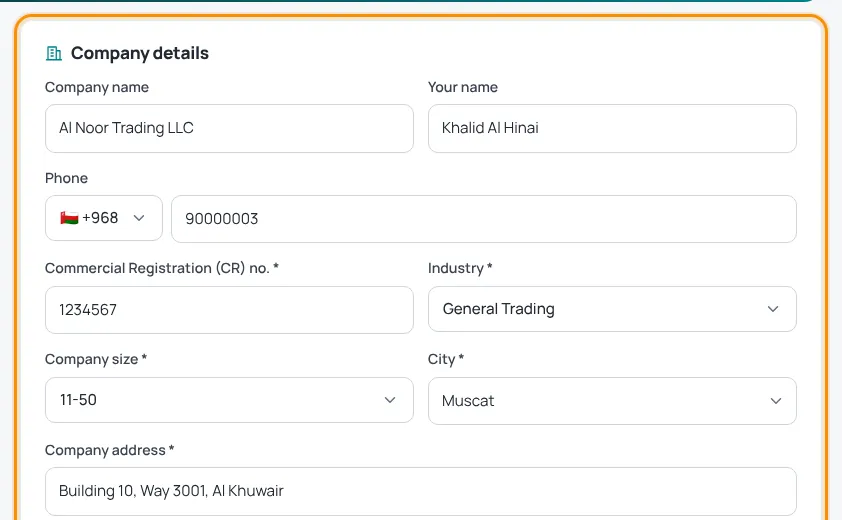
Company details (employers)
Update company name, contact name, phone, CR number, industry, company size, city, address and website, then press Save. These details fill in your job adverts and invoices.
One account for both
- Job seeker who is also hiring? Open Also hiring?, add your company details and press Save & start posting jobs.
- Employer also looking for a job? Click Also looking for a job? to create your job profile.
Change password
- Under Change password, type your Current password.
- Type a New password of at least 8 characters.
- Press Save.
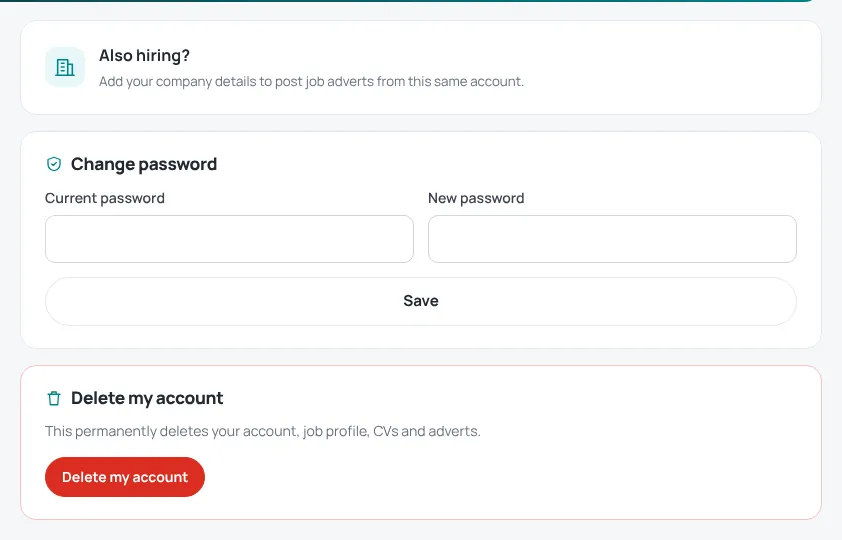
Photo or logo
Add a photo from the camera icon at the top of your account. To remove it, use Remove photo in Settings.
Delete your account
Delete my account permanently deletes your account, job profile, CVs and adverts. This cannot be undone.
Only want fewer emails? You do not need to delete your account — see Stop job alerts or emails.
Was this article helpful?
Thanks for your feedback!
Sorry about that. Tell us what was missing in a support ticket and we will help you. Open a support ticket
Related articles
Your account dashboardWhat you find under My account: overview, job alerts, CVs, job profile, adverts, payments, support and settings.Sign in and reset your passwordHow to sign in, what to do if you forgot your password, and how to change it.Stop job alerts or emailsPause job alerts, stop news and offers, or delete your data.
