Paid services — instant alerts, AI Auto-Apply, premium CV designs, advert services, upgrades and paid edits — are all paid on the same secure checkout page on hiretalent.om.
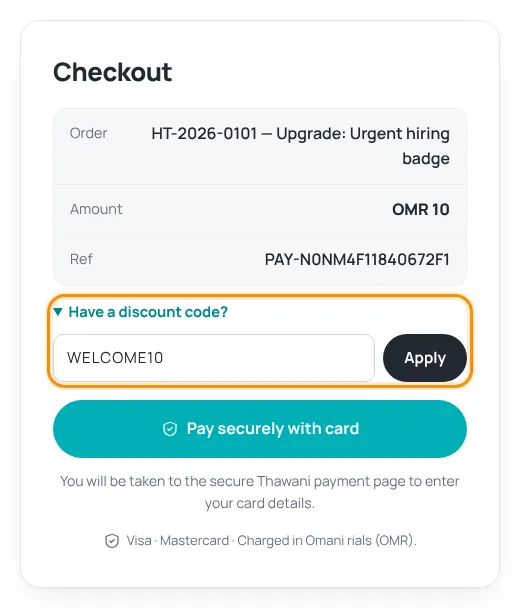
Pay by card
- Check the order and amount on the checkout page.
- Have a discount code? Click Have a discount code?, type the code and press Apply. The new amount is shown.
- Press Pay securely with card. You are taken to the secure Thawani payment page to enter your Visa or Mastercard details.
- After payment you come back to HireTalent and see “Payment received — thank you!”. The service starts right away and we email you a receipt.
Amounts are charged in Omani rials (OMR). If you browse in USD, the dollar amount is an approximate conversion.
Discount codes
- One code per payment. Press Remove to take a code off.
- A code may be for a specific product, a limited time, a limited number of uses or one account only. If it cannot be used, the page tells you why.
- If a code makes the total free, the order completes without a card.
Unfinished payments
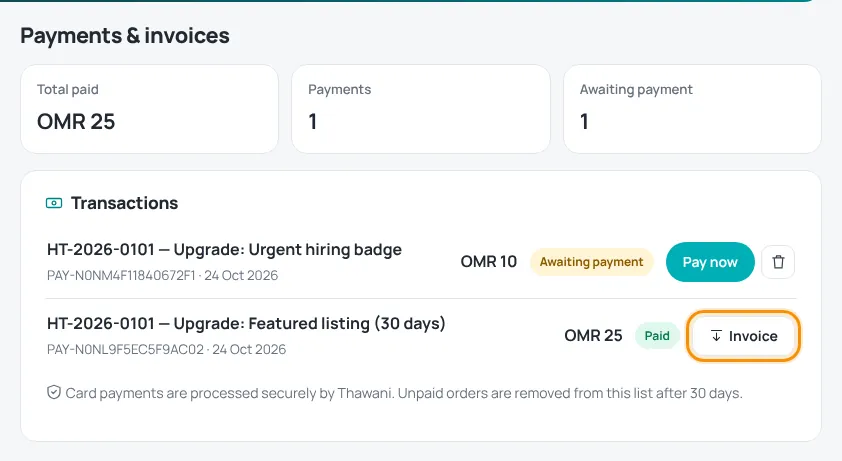
- Open My account › Payments.
- Orders marked “Awaiting payment” have a Pay now button. Use the bin icon to cancel an order you no longer want.
- Unpaid orders are removed from the list after 30 days.
Only pay on hiretalent.om/pay/… and the Thawani page it opens. HireTalent never asks you to pay by bank transfer to a person, by WhatsApp or by phone.
You must confirm your email before you can pay. Need a receipt? See Download invoices.
Was this article helpful?
Thanks for your feedback!
Sorry about that. Tell us what was missing in a support ticket and we will help you. Open a support ticket
Related articles
Download invoicesGet a PDF invoice for every paid order from your account.Job alerts: weekly and instantGet matching jobs by email — free every week, or instantly with a paid plan.Edit, boost or delete an advertFree edits before publishing, paid edits of live adverts, upgrades and deleting.CV designs: free and premiumWhat the green Free badge and the gold crown mean, and how to unlock premium designs.
