Our team checks every advert before it is published — usually within 1–2 business days. We email you at each change, and you can follow everything under My account › My adverts.
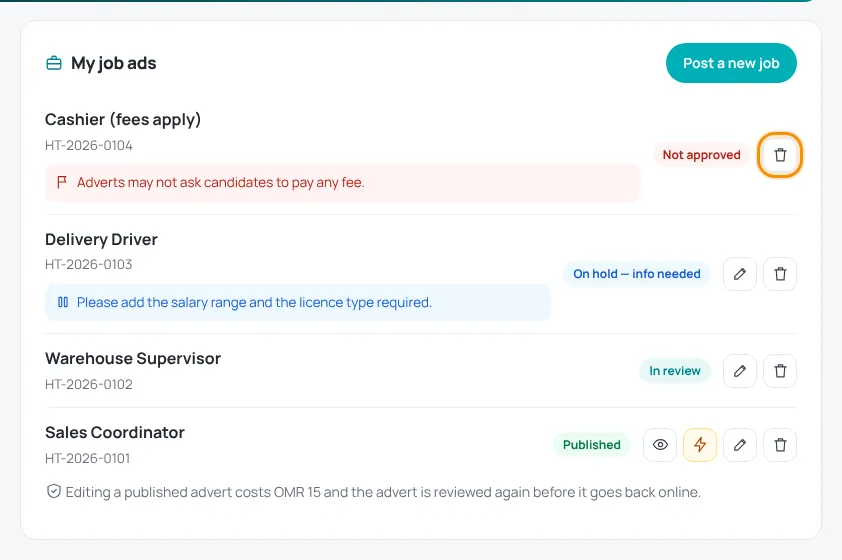
What the statuses mean
- In review — we received your advert and are checking it.
- Awaiting payment — you chose paid services; press Pay now to complete the payment. Review starts after payment.
- On hold — info needed — we need something from you. Our message is shown under the advert. Edit the advert (no fee) and save — it goes back to review.
- Not approved — the advert cannot be published; the reason is shown under it.
- Published — the advert is live. Use the eye icon to view it.
- Deleted — you deleted the advert.
The action buttons
- Eye — view the live advert.
- Lightning — boost the advert with paid upgrades.
- Pencil — edit the advert.
- Bin — delete the advert.
See Edit, boost or delete an advert.
Typical reasons for “On hold”: a missing salary range or licence type, an unclear how-to-apply method, or company details we need to check.
Adverts that ask candidates to pay any fee are never approved.
Was this article helpful?
Thanks for your feedback!
Sorry about that. Tell us what was missing in a support ticket and we will help you. Open a support ticket
Related articles
Post a jobCreate an employer account, fill in the vacancy, add optional services and submit for review.Edit, boost or delete an advertFree edits before publishing, paid edits of live adverts, upgrades and deleting.Paying on HireTalentHow checkout works: card payment with Thawani, discount codes and pending orders.
